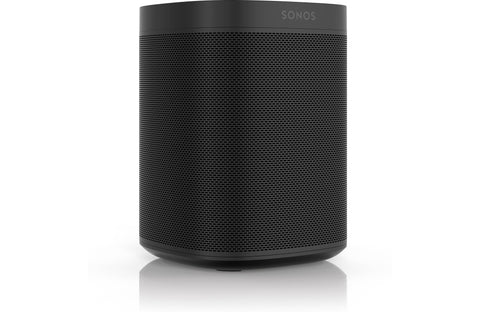
Spread music throughout your home The Sonos One SL wireless powered speaker is just about the easiest way to bring music into a room. You can stream from Spotify® Premium, Apple Music®, Rhapsody®, SiriusXM, and internet radio stations. Enjoy songs stored on your home computer or portable device. Add a second One SL, or other Sonos device, and you've got the makings of a wireless multi-room audio system. And that's just for starters.
Expand to any (or every) room Your Sonos One SL can be part of a larger multi-room audio system. Place Sonos players like the Amazon Alexa and Google Home compatible Sonos One (Gen 2) in every room where you want to listen to music.
You can set up the players to work on your existing Wi-Fi® network. Or you can connect any Sonos speaker to your network router, and Sonos will create its own dedicated wireless network for even better performance. You can also use a Boost to create this network if you can't place a speaker near your router.
Get a pair for stereo music or wireless surround sound The Sonos One SL by itself delivers rich, full sound. You can also wirelessly pair it with another Sonos One SL or Sonos One (Gen 2) in the same room for spacious two-channel stereo music. You can also use Sonos One SL speakers as wireless rear-channel speakers with a Sonos sound bar and SUB, creating an immersive 5.1 home theater sound system.
The Sonos app gives you easy wireless control Download the free Sonos control app to your smartphone or tablet. Now your device can control not only your Sonos One SL, but any and all other Sonos devices in your home. Have all your Sonos speakers play the same song, or have each one play something different — simultaneously.
Easily navigate and search through playlists and tracks stored on your computer, or select an internet radio station. Create customized playlists on the fly for individual rooms or for playback over your entire Sonos system. You can also mute or adjust the volume of each of your players.
Compatible with Apple AirPlay 2 The Sonos One SL has Apple AirPlay 2 built-in. That means you can stream audio directly from your iPhone®, iPad®, or Mac® computer through your Sonos system. That includes soundtracks from YouTube® videos and Netflix movies.
Trueplay speaker tuning for optimal sound If you use your Sonos control app on an Apple device, you can use it to fine-tune the Sonos One SL with Sonos's Trueplay feature. It uses the mic built into your device to measure how the sound reflects off your walls and furnishings, and then it adjusts the speaker's settings for the best possible sound.
FEATURES
Airplay2
Capacitive Touch Controls
Humidity Resistant
Automatic Software Updates
WiFi
TECHNICAL SPECS
Connections
Ethernet Port Yes
USB Port No
Aux Input No
Phono Input No
Digital Input No
HDMI Input No
Headphone Jack No
Subwoofer Output Optional Wireless
Wireless Features
Bluetooth No
Wi-Fi 802.11 b/g
Wi-Fi Bands 2.4 GHz
Audio Specs
Max. Digital Audio Bit Depth 16-bit
Max. Digital Audio Sample Rate 44.1 kHz
Ecosystems
Apple AirPlay AirPlay 2
Sonos: Sonos (S2)
Music Services
Amazon Music Amazon Music HD
Apple Music Yes
iHeart Radio Yes
Pandora Yes
Qobuz Yes
SiriusXM Yes
Spotify Free
Tidal Yes
TuneIn Yes
YouTube Music Yes
Control
Handheld Remote No
Control by app iOS, Android, Windows, Mac
Amazon Alexa Optional
Google Assistant Optional
Other Specs
Width (Inches) 4.75
Height (Inches) 6.375
Depth (Inches) 4.75
Parts Warranty 1 Year
Labor Warranty 1 Year
DISCONTINUED
Sonos One SL Wireless Bookshelf Speaker
Unfortunately, this product has been discontinued. But don’t worry – there’s a new and updated version
available!
Free standard shipping on all orders within the continental US.
Dedicated Support from Start to Finish
Concierge-Level Experience tailored to your needs
Assistance with Troubleshooting and Product Insights
Expert help for Product Set-Up
Free Shipping on all orders
DESCRIPTION
Spread music throughout your home The Sonos One SL wireless powered speaker is just about the easiest way to bring music into a room. You can stream from Spotify® Premium, Apple Music®, Rhapsody®, SiriusXM, and internet radio stations. Enjoy songs stored on your home computer or portable device. Add a second One SL, or other Sonos device, and you've got the makings of a wireless multi-room audio system. And that's just for starters.
Expand to any (or every) room Your Sonos One SL can be part of a larger multi-room audio system. Place Sonos players like the Amazon Alexa and Google Home compatible Sonos One (Gen 2) in every room where you want to listen to music.
You can set up the players to work on your existing Wi-Fi® network. Or you can connect any Sonos speaker to your network router, and Sonos will create its own dedicated wireless network for even better performance. You can also use a Boost to create this network if you can't place a speaker near your router.
Get a pair for stereo music or wireless surround sound The Sonos One SL by itself delivers rich, full sound. You can also wirelessly pair it with another Sonos One SL or Sonos One (Gen 2) in the same room for spacious two-channel stereo music. You can also use Sonos One SL speakers as wireless rear-channel speakers with a Sonos sound bar and SUB, creating an immersive 5.1 home theater sound system.
The Sonos app gives you easy wireless control Download the free Sonos control app to your smartphone or tablet. Now your device can control not only your Sonos One SL, but any and all other Sonos devices in your home. Have all your Sonos speakers play the same song, or have each one play something different — simultaneously.
Easily navigate and search through playlists and tracks stored on your computer, or select an internet radio station. Create customized playlists on the fly for individual rooms or for playback over your entire Sonos system. You can also mute or adjust the volume of each of your players.
Compatible with Apple AirPlay 2 The Sonos One SL has Apple AirPlay 2 built-in. That means you can stream audio directly from your iPhone®, iPad®, or Mac® computer through your Sonos system. That includes soundtracks from YouTube® videos and Netflix movies.
Trueplay speaker tuning for optimal sound If you use your Sonos control app on an Apple device, you can use it to fine-tune the Sonos One SL with Sonos's Trueplay feature. It uses the mic built into your device to measure how the sound reflects off your walls and furnishings, and then it adjusts the speaker's settings for the best possible sound.